Case study
Django Cotton Gallery
MaintainedDrop-in playground for Django Cotton component libraries — live preview with controls generated from your annotations, lint report and insights dashboard.
The problem
There was nothing native for previewing Cotton components.
Storybook exists, and from what I researched it can be integrated into Django. But it does not get you far: it does not really let you work. It is a tool built for another ecosystem, and you feel it at every step.
And there is an underlying limit no editor extension can get around: because of where it lives, it cannot render the component the way the user designed it. The editor does not run your Django project, so it has none of your styles, your context or your configuration.
To actually see the component, you have to be inside the project.
What it is
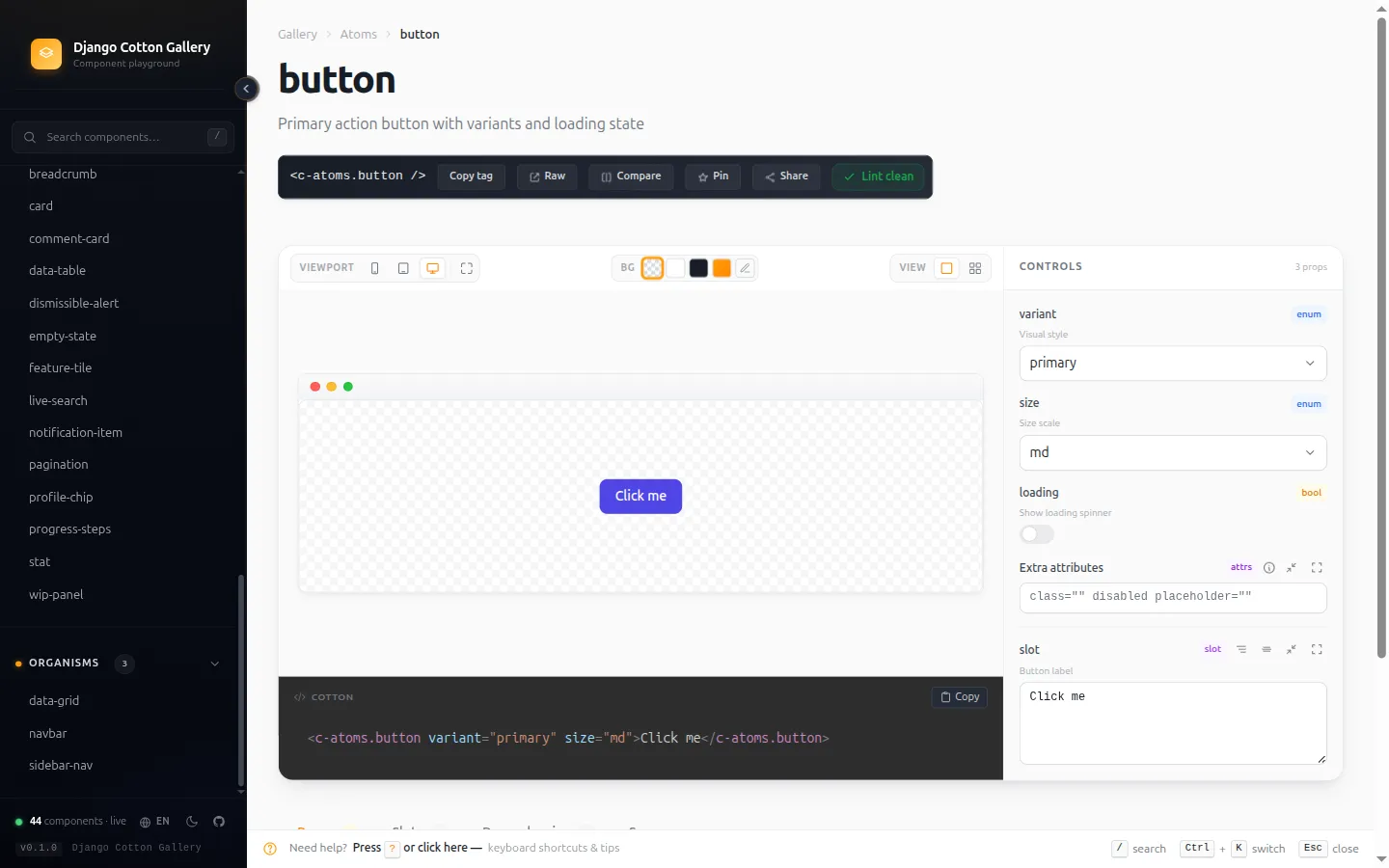
A playground for Django Cotton component libraries. It installs into an existing Django project and exposes a browsable gallery of its components.
What it ships:
- Live playground. Every component renders with controls generated automatically from its
@propannotations. Change a prop and see it immediately. Copy the tag and you are done. - Lint report with three severity tiers — errors, warnings and hints — for
@prop/<c-vars>mismatches, missing descriptions and undeclared variables. - Insights dashboard: config health, annotation coverage, zombie components and a most-referenced ranking. Catch the rot before it ships.
Ctrl+Kswitcher with structured filters:prop:size,slot:actions,accepts-attrs,has-named-slots,deprecated.- Refactor planner with the transitive dependency tree, a form-based annotation builder, and a side-by-side compare view.
- Interface in four languages: English, Spanish, Basque and French.
The other half
Cotton Props does the same job: help you write components and catch mistakes. What differs is where each one lives and what it can show.
| gallery | props | |
|---|---|---|
| Where | Inside the project | Inside the editor |
| When | While you look | While you type |
| Previews | Yes | No |
This one previews because it runs inside the project. That one cannot, because it lives in the editor and the editor does not render. They are the two places component work happens.
Decisions
Invent the annotation format, and have both tools consume it
Context. Cotton has no way to document a component. Without that there is nothing to autocomplete, nothing to validate and nothing to generate controls from.
Decision. Define a format of my own — the @prop annotations above the <c-vars> — and build
the two tools that read it in parallel: the Python library that plugs into Django, and the VS Code
extension.
Why it matters. These are not two projects that happen to look alike: they are two consumers of the same convention. You document the component once and both the editor and the gallery use it.
And the playground falls out of it for free. Because the annotation declares each prop’s type, the gallery knows which control to draw without anyone configuring it:
| Annotated type | Control it generates |
|---|---|
text | Free-text field |
select | Dropdown with the declared options |
boolean | Toggle |
number | Numeric field |
Change a value and the component re-renders. The controls are not a list to be maintained separately: they are a reading of the documentation you already wrote.
The linter runs in CI too
The same engine that draws the report in the gallery runs as a management command:
python manage.py cotton_lint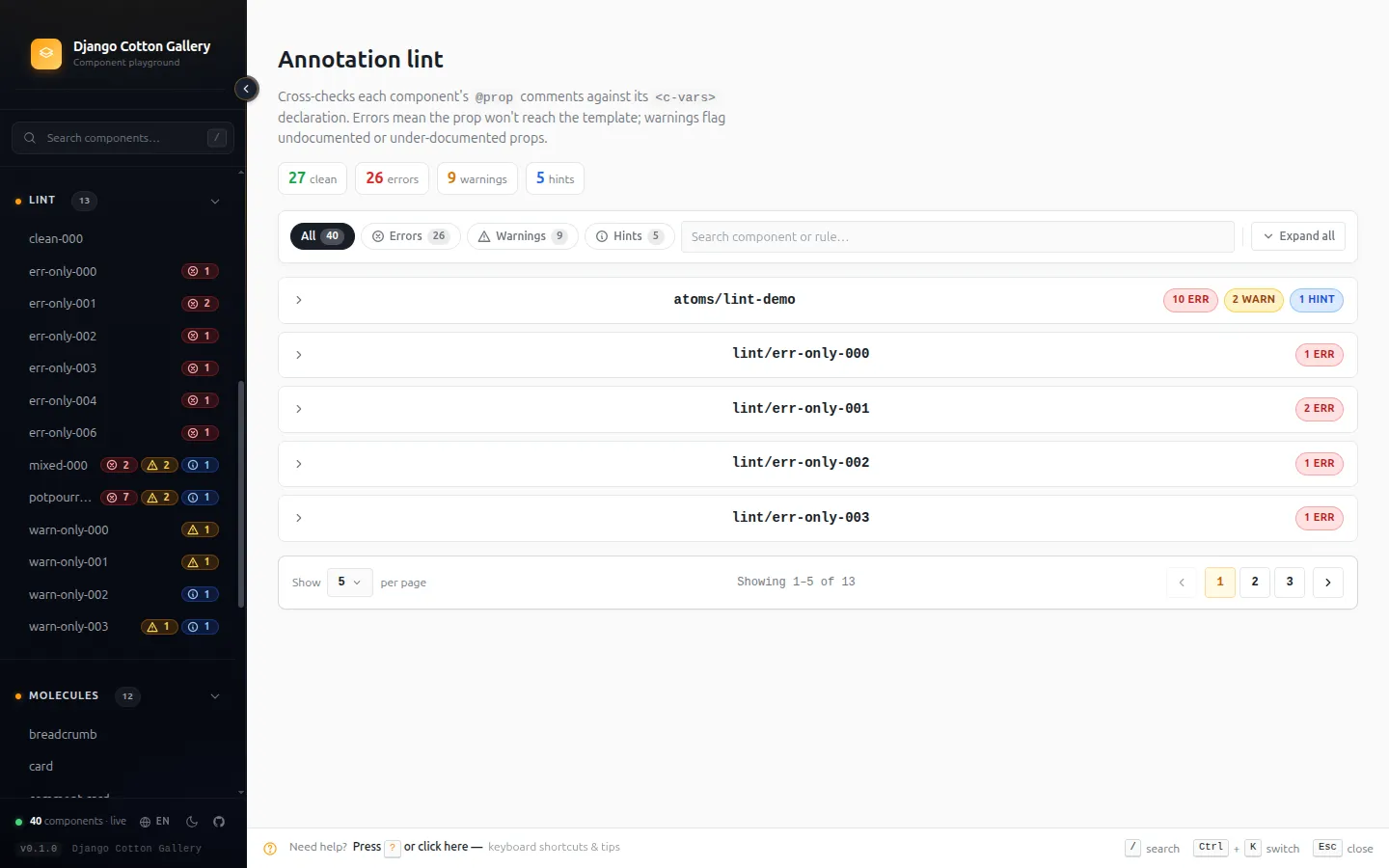
The gallery is not only a viewer: it is a gate you can put in the pipeline.
Limits
You have to start the server. To see a component’s errors you have to bring the web up, and while you type there is no IntelliSense in the editor. It is exactly the inverse of the extension’s limit, and that is why both exist: each covers what the other cannot reach.
| Cannot | |
|---|---|
| gallery | Help you while you type in the editor |
| props | Render the component the way you designed it |
Detection is regex-based, same as the extension. A component written in an odd enough way falls outside what the tool considers a component, and then it cannot see it.
Isolating the preview
For two versions the component rendered on the gallery page itself, and that worked until someone brought a modal.
A modal with its backdrop — the dark layer that covers the screen — does not stay inside its slot: it spreads over the whole gallery and can lock it up. The component was doing exactly what it should; the problem was where I was putting it.
There were two ways out and one was clearly better:
- Limit the preview, disabling anything that can escape its container. Cheap, but it cripples precisely the components you most want to look at.
- One
iframeper preview. Each component in its own document, with its ownbody. More expensive, but it is real isolation and takes nothing away from the component.
1.0.0 brought the iframe, and it fixed three things beyond the modal: the gallery’s unlayered
heading reset was overriding the consumer’s @layer typography; a block-level root collapsed to
0px inside the flex stage that centres it; and media queries now fire on the stage width, which
makes the viewport switcher real. Index thumbnails render in their own document too, and are
dropped once a card scrolls away rather than keeping one JS runtime alive per component.
Status
Published on PyPI and on its first stable release: the annotation grammar and the
DJANGO_COTTON_GALLERY_* settings are public API, renamed or removed only on a major version.
Runs on Python 3.10 and above, Django 4.2 to 6.x. Documentation published, changelog kept. Open
source, MIT licensed.
pip install django-cotton-gallery